
You can create a scheduled post with WP-CLI in one command, so you’d expect to be able to schedule an existing draft in one command too. You can’t. In early October I scheduled posts on my own sites with wp post update and they went live straight away. So I ran a proper test on 19 November 2026 (WordPress 7.1.5, PHP 8.4.27, site clock set to UTC) to find out exactly which commands schedule a post and which ones publish it.
The result
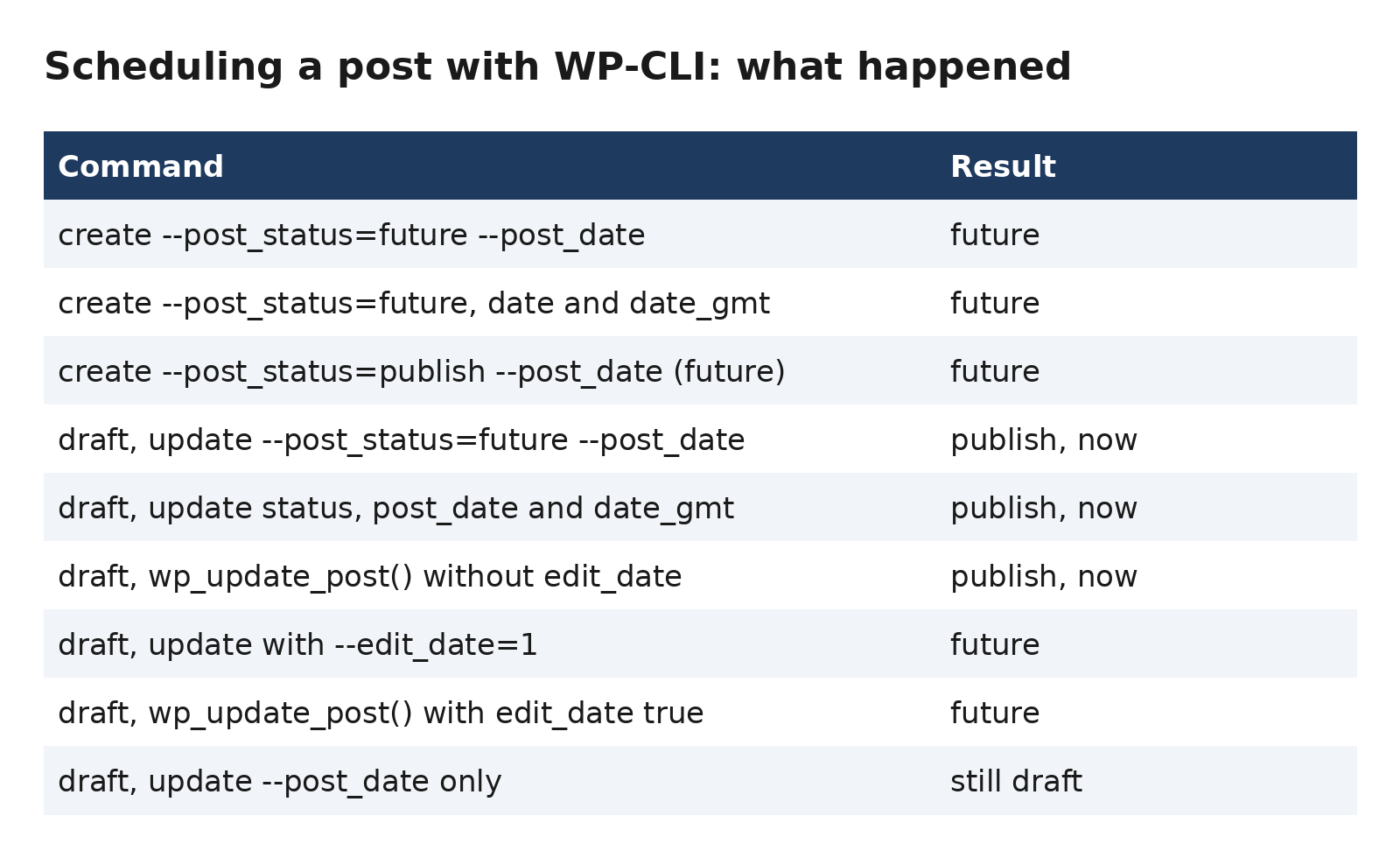
Creating a new post with a future date works every time. It scheduled correctly with --post_status=future, with or without --post_date_gmt, and it even worked with --post_status=publish and a future date (WordPress changed it to future for me). The trouble is only with updating an existing draft.
The ones that published immediately
I made 3 test drafts and tried to schedule each for 22 November at 09:00. All 3 went live at once, and the date I’d asked for was replaced by the current time (10:56:49 on one of them):
wp post update 105 --post_status=future --post_date="2026-11-22 09:00:00"
wp post update 107 --post_status=future --post_date="2026-11-22 09:00:00" --post_date_gmt="2026-11-22 09:00:00"
wp eval "wp_update_post(['ID'=>112,'post_status'=>'future','post_date'=>'2026-11-22 09:00:00','post_date_gmt'=>'2026-11-22 09:00:00']);"
Adding --post_date_gmt didn’t help, which surprised me, because I’d assumed that was the missing piece. Updating only --post_date on a draft did something different again: the post stayed a draft and the date was ignored, so nothing visibly went wrong until I looked at the date.
The two that worked
The difference is the edit_date argument. The reason is in wp_update_post() in wp-includes/post.php: if the saved post is a draft with an empty GMT date and edit_date isn’t set, WordPress decides the draft shouldn’t have a date and resets it to the current time. A future status with a date of “now” is simply a published post. With edit_date set, the date you passed in is used. Both of these left the post as future at 09:00 on 22 November:
wp post update 114 --post_status=future --post_date="2026-11-22 09:00:00" --post_date_gmt="2026-11-22 09:00:00" --edit_date=1

wp eval "wp_update_post(['ID'=>109,'post_status'=>'future','post_date'=>'2026-11-22 09:00:00','post_date_gmt'=>'2026-11-22 09:00:00','edit_date'=>true]);"
My routine now
- Create or keep the post as a draft.
- Schedule it with
--edit_date=1, setting both date fields. - Check with
wp post list --post_status=future --fields=ID,post_title,post_datebefore you walk away.
That last check is the important one, because a post that has gone live looks exactly like one that was scheduled until you actually list it.
What I didn’t test
My test site runs on UTC, so I haven’t tested what happens on a site with a timezone offset (you’d need to work out post_date_gmt yourself there). I also only tested posts, not pages or custom post types. And yes, I did delete all 9 test posts afterwards (they were live on the site for a few seconds, which is why I did the tests on a site with almost no readers!).