
To put text on an image with PHP GD, call imagettftext() with a TrueType font. The part that catches everyone out is making the text fit: a long title runs off the edge unless you measure it first. This is the function I use to shrink each line until it fits its box, with code I ran on PHP 8.4.27.
I wrote it for the posters I make for a radio show, where the title, time and presenter name all change from week to week. A fixed font size can’t cope with that. Measuring the text and stepping the size down can.
What you need first
- PHP with the GD extension and FreeType support. Check with
gd_info()["FreeType Support"], which returnedtrueon my server. - A
.ttffont file. I used DejaVu Sans Bold from/usr/share/fonts/truetype/dejavu/, which is on many Linux servers. On Windows, take one fromC:\Windows\Fonts.
The full script
It draws four lines onto an 800 by 800 image, each inside its own box, and saves a PNG next to the script. The fourth line is deliberately far too long, to show the shrinking working.
<?php
error_reporting(E_ALL);
ini_set('display_errors', '1');

$font = '/usr/share/fonts/truetype/dejavu/DejaVuSans-Bold.ttf';

function fitText($img, $text, $font, $colour, $left, $top, $right, $bottom, $startSize = 120, $minSize = 10) {
    $boxW = $right - $left;
    $boxH = $bottom - $top;
    $size = $startSize;

    do {
        $box = imagettfbbox($size, 0, $font, $text);
        $textW = $box[2] - $box[0];
        $textH = $box[1] - $box[7];
        if ($textW <= $boxW && $textH <= $boxH) {
            break;
        }
        $size--;
    } while ($size > $minSize);

    $x = $left + ($boxW - $textW) / 2 - $box[0];
    $y = $top + ($boxH - $textH) / 2 + $textH - $box[1];
    imagettftext($img, $size, 0, (int)round($x), (int)round($y), $colour, $font, $text);

    return $size;
}

$W = 800;
$H = 800;
$img = imagecreatetruecolor($W, $H);
$bg    = imagecolorallocate($img, 30, 30, 46);
$light = imagecolorallocate($img, 235, 235, 235);
imagefilledrectangle($img, 0, 0, $W, $H, $bg);

$lines = [
    ['NIGHT SHIFT',               0.10, 0.15, 0.90, 0.35, 120],
    ['FRIDAYS 9PM',              0.10, 0.40, 0.90, 0.50, 80],
    ['WITH SAM SAMPLE',          0.10, 0.55, 0.90, 0.65, 80],
    ['A MUCH LONGER LINE THAT WILL NEVER FIT', 0.10, 0.70, 0.90, 0.80, 80],
];
foreach ($lines as [$text, $l, $t, $r, $b, $start]) {
    $size = fitText($img, $text, $font, $light, $l * $W, $t * $H, $r * $W, $b * $H, $start);
    echo "$text -> $size pt\n";
}

imagepng($img, __DIR__ . '/poster-test.png');
imagedestroy($img);
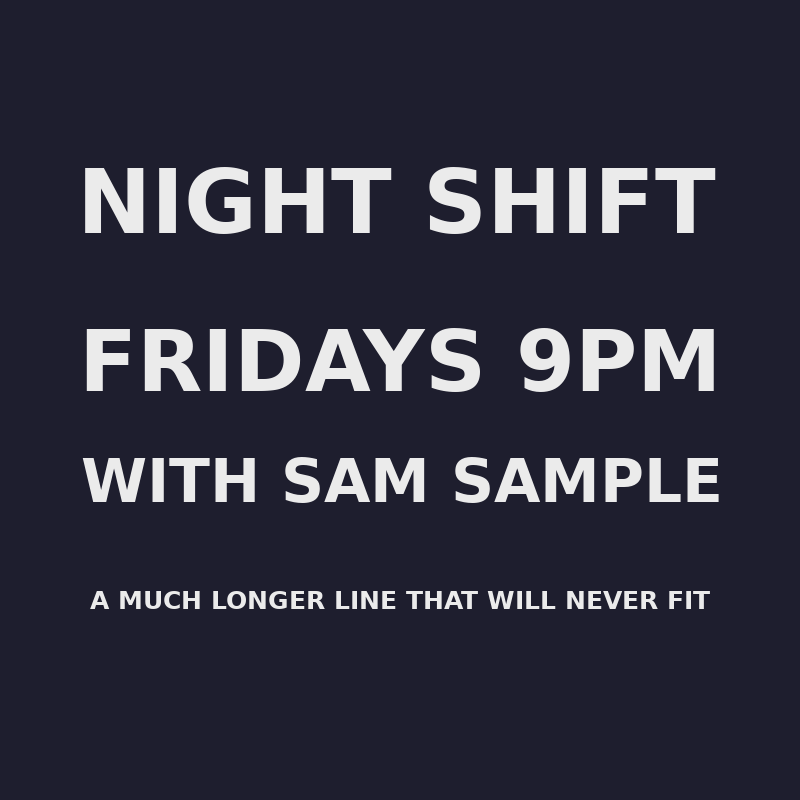
Running it printed the final size for each line:
NIGHT SHIFT -> 67 pt
FRIDAYS 9PM -> 64 pt
WITH SAM SAMPLE -> 45 pt
A MUCH LONGER LINE THAT WILL NEVER FIT -> 19 pt
How it works
imagettfbbox() tells you how big the text would be at a given size, without drawing anything. The function starts at your largest size, measures, and takes one point off until the width and height both fit inside the box. Then it centres the text in the box and draws it.
There are two details worth knowing:
- The baseline.
imagettftext()positions text by its baseline, not its top. The bounding box includes the descenders (the tails on letters like g and j). For a 40pt “Hjg” in this font, the box ran from -40 above the baseline to 11 below it. That is why the script subtracts$box[1], so that the visible text is centred and not pushed low. - The minimum size. If the text still doesn’t fit at the minimum, the loop stops and you get tiny text rather than an endless loop. Set the minimum to the smallest size you can bear to read.
The error you’ll probably hit
The commonest failure is a wrong font path. GD doesn’t throw an exception. It raises a warning and returns false:
Warning: imagettfbbox(): Could not find/open fontWith a path that didn’t exist, imagettfbbox() returned false. I also tried a bare filename without a path (DejaVuSans-Bold.ttf) and it failed the same way. A bare name without the extension (DejaVuSans-Bold) worked when I set the GDFONTPATH environment variable to the font folder. The simplest fix is to use a full path, as the script does.
If your poster comes out blank or the page shows a warning, check error_reporting(E_ALL) is on, as it is at the top of the script, and look for that message first.
Using it on a web page
To send the image straight to the browser instead of saving it, add header('Content-Type: image/png'); before any output and call imagepng($img); with no filename. Remember that any warning printed before the image will corrupt it, so turn display_errors off for that version.