If you post to Bluesky from a PHP script, you’ll find that links, hashtags and mentions just sit there as plain text. Paste in https://example.com and it won’t be clickable. Type #coffee and it isn’t a tag. Bluesky doesn’t spot any of these for you. You have to tell it where they are, using something called facets. I use this in my own posting scripts, and here is how it works, with the one bit that trips everybody up.
What a facet is
A facet says “the bytes from here to there in this text are a link” (or a tag, or a mention). You add a list of them to the post record next to the text:
$record = [
    '$type'     => 'app.bsky.feed.post',
    'text'      => $text,
    'facets'    => build_facets($text),
    'createdAt' => date(DATE_ATOM),
];
Each facet has a start, an end and a feature. There are three kinds of feature: #link (needs a full URL), #tag (the tag without the #) and #mention (needs the person’s DID, not their handle).
The bit that trips everybody up: bytes, not characters
The start and end are positions in bytes. For plain English text a byte is a character, so it all looks fine, right up until someone puts a é or an emoji earlier in the post. Then everything after it is out by a few places and your link underlines the wrong words.
I tried it with this text:
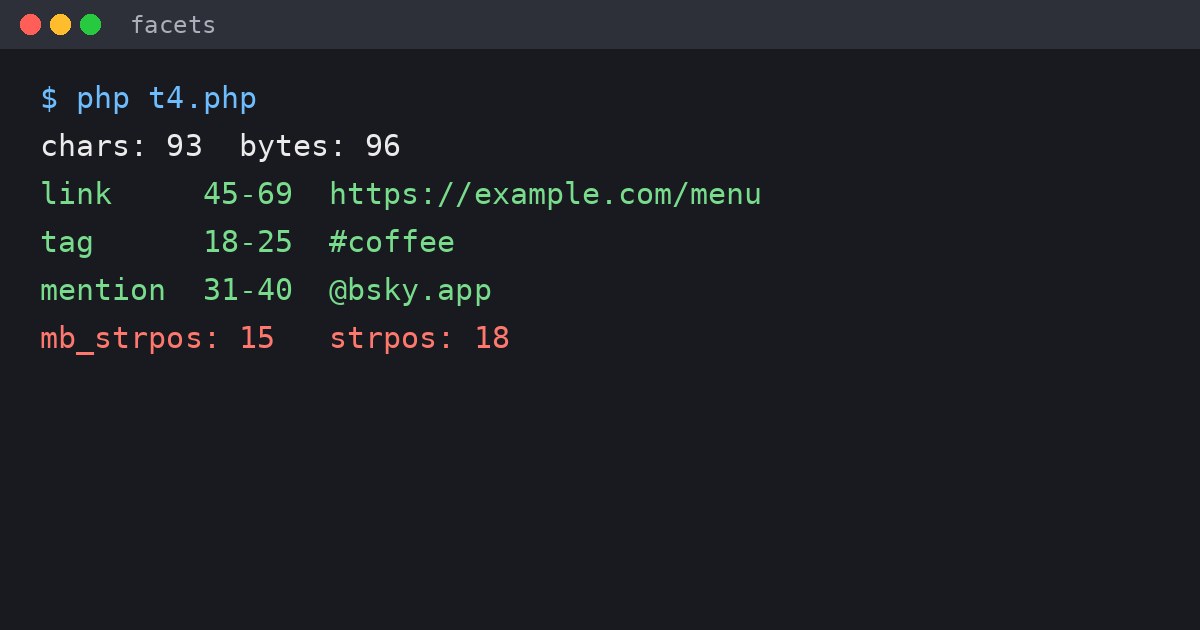
Café opening ☕ #coffee with @bsky.app see https://example.com/menu. Not real: @nobody.invalidIt is 93 characters long but 96 bytes. The #coffee tag starts at position 18 in bytes, but mb_strpos() will tell you 15. Use that and the tag would be 3 places out! The fix in PHP is to use the plain byte-based functions (strlen(), strpos(), substr()) and PREG_OFFSET_CAPTURE, which also returns byte positions.
The code
This function finds links, hashtags and mentions and returns the facets. Mentions are looked up through Bluesky’s public API, and a handle that doesn’t exist is left as plain text rather than breaking the post.
function resolve_did(string $handle): ?string
{
    $url = 'https://public.api.bsky.app/xrpc/com.atproto.identity.resolveHandle?handle=' . urlencode($handle);
    $json = @file_get_contents($url);
    return $json ? (json_decode($json, true)['did'] ?? null) : null;
}

function build_facets(string $text): array
{
    $facets = [];

    // PREG_OFFSET_CAPTURE gives byte offsets, which is what Bluesky wants
    preg_match_all('#https?://[^\s]+#u', $text, $m, PREG_OFFSET_CAPTURE);
    foreach ($m[0] as [$url, $start]) {
        $url = rtrim($url, '.,;:!?)');
        $facets[] = [
            'index'    => ['byteStart' => $start, 'byteEnd' => $start + strlen($url)],
            'features' => [['$type' => 'app.bsky.richtext.facet#link', 'uri' => $url]],
        ];
    }

    preg_match_all('/(?<![\w\/])#(\p{L}[\p{L}\p{N}_]*)/u', $text, $m, PREG_OFFSET_CAPTURE);
    foreach ($m[0] as $i => [$tag, $start]) {
        $facets[] = [
            'index'    => ['byteStart' => $start, 'byteEnd' => $start + strlen($tag)],
            'features' => [['$type' => 'app.bsky.richtext.facet#tag', 'tag' => $m[1][$i][0]]],
        ];
    }

    preg_match_all('/(?<![\w\/])@([a-zA-Z0-9][a-zA-Z0-9.-]*\.[a-zA-Z]{2,})/u', $text, $m, PREG_OFFSET_CAPTURE);
    foreach ($m[0] as $i => [$mention, $start]) {
        $did = resolve_did($m[1][$i][0]);
        if ($did === null) {
            continue; // not a real handle, so leave it as plain text
        }
        $facets[] = [
            'index'    => ['byteStart' => $start, 'byteEnd' => $start + strlen($mention)],
            'features' => [['$type' => 'app.bsky.richtext.facet#mention', 'did' => $did]],
        ];
    }

    return $facets;
}
Run on the sample text above, it gives:
link   45-69  https://example.com/menu
tag    18-25  #coffee
mention 31-40 @bsky.app
The fake handle at the end (@nobody.invalid) was correctly left alone, because it doesn’t resolve to anyone.
Checking it against real posts
I can’t show you a live test post, so I tested the part that goes wrong. I downloaded the 100 most recent posts from the official @bsky.app account (this needs no login) and picked out the 5 that had hashtags. My function found exactly the same tag positions as Bluesky’s own app in 4 of them.
The fifth was a Japanese hashtag, which my first version missed because I’d only allowed A to Z. That’s why the pattern uses \p{L}, which means any letter in any language. After that change I got 4 out of 5, and the remaining one was a post using cashtags ($AAPL), which Bluesky treats as a tag too. I haven’t added those, because I don’t post about shares!
Links in the official posts couldn’t be compared this way, because Bluesky’s app shortens the displayed text to something like bsky.social/about/blog/0... and links it to the full address. That’s a good trick if you want to do it yourself, as the text and the link in the facet don’t have to match.
Posting it
Once you have your token (that part is unchanged from a plain text post), the facets go in alongside the text. One thing to remember is to build them from the final text. If you trim or add to the text after building the facets, every position changes.
$text   = 'Café opening ☕ #coffee with @bsky.app see https://example.com/menu';
$record = [
    '$type'     => 'app.bsky.feed.post',
    'text'      => $text,
    'facets'    => build_facets($text),
    'createdAt' => date(DATE_ATOM),
];

$ch = curl_init('https://bsky.social/xrpc/com.atproto.repo.createRecord');
curl_setopt_array($ch, [
    CURLOPT_POST           => true,
    CURLOPT_RETURNTRANSFER => true,
    CURLOPT_HTTPHEADER     => ["Authorization: Bearer $token", 'Content-Type: application/json'],
    CURLOPT_POSTFIELDS     => json_encode([
        'collection' => 'app.bsky.feed.post',
        'repo'       => 'your-handle.bsky.social',
        'record'     => $record,
    ]),
]);
$response = json_decode(curl_exec($ch), true);
curl_close($ch);
Only one rule from my own scripts is worth stealing: I make tags start with a letter, so “Show #416” isn’t turned into a tag. Posts about episode numbers are now correctly un-clickable.