
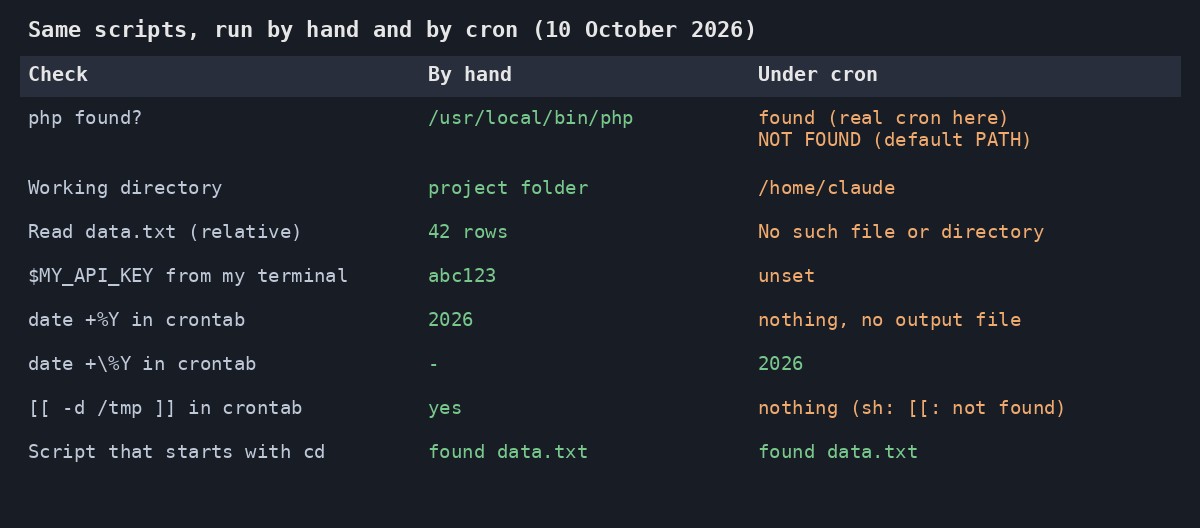
You run the script by hand and it works perfectly. You put the very same command in crontab, wait for the next minute, and nothing happens. No error, no output, no clue. It catches almost everyone at least once, so on 10 October 2026 I set up a small test and ran every classic cause both by hand and under cron, to see exactly what each one looks like.
The short version is that cron isn’t your terminal. It starts your command with almost nothing: a different shell, a different working directory and hardly any environment variables. Here’s what I found, from the most common cause to the sneakiest.
1. The working directory is your home folder, not your project
This is the big one. By hand you probably cd into the project first. Cron starts in your home directory, so a relative path like data.txt points at the wrong place. My test script printed /home/claude as its working directory under cron, and reading data.txt gave “No such file or directory”.
In PHP it’s even sneakier, because the failure is only a warning and the script carries on. This reads a 1-line file:
<?php
$data = file_get_contents('data.txt');
echo "Read: " . trim($data) . "\n";
By hand it printed Read: 42 rows. From a cron-style run in my home folder it printed a warning and then a cheerful, empty Read:. The fix is __DIR__, which is always the folder the script itself lives in:
<?php
$data = file_get_contents(__DIR__ . '/data.txt');
echo "Read: " . trim($data) . "\n";
That printed Read: 42 rows both ways. In a shell script, the equivalent is cd "$(dirname "$0")" || exit 1 as the first line, which also worked under cron.
2. The percent sign is special in a crontab
This one is a nasty surprise! In a crontab line, an unescaped % means “end of the command, the rest is input”. So date +%Y > out.log never even created its log file. No error anywhere. Escaping it as date +\%Y worked first time and wrote 2026. If you build dated filenames in a crontab, that’s the one to check first. (Or put the command in a script and call the script, so the crontab line has no percent signs at all.)
3. Cron uses sh, not bash
On my Ubuntu 24.04 server /bin/sh is dash, and cron runs your line with it. A test like [[ -d /tmp ]] works in bash but under cron it produced nothing at all, because dash says [[: not found and exits with 127. Either start the script with #!/bin/bash and call the script, or put SHELL=/bin/bash at the top of the crontab (I tried that, and the [[ test then printed yes from a real cron run).
4. Your environment variables aren’t there
I exported a made-up MY_API_KEY=abc123 in my terminal. By hand the script saw it, and under cron it was unset, which is no surprise, but it’s easy to forget when the variable lives in your .bashrc. Cron doesn’t read that file. Read secrets from a config file instead, or set them at the top of the crontab.
5. PATH might be shorter than you think
The textbook answer is that cron’s PATH is only /usr/bin:/bin. On the default, php wasn’t found at all in my test, because mine lives in /usr/local/bin. But when I ran a real cron job on my own server, PATH was a long one and php was found, so this depends on how cron was started. Don’t rely on either. Use the full path to every program (command -v php will tell you what to type) and you’ll never have to find out.
A crontab line that avoids all five
SHELL=/bin/bash
*/5 * * * * /usr/local/bin/php /home/me/scripts/report.php >> /home/me/logs/report.log 2>&1
I ran that line for real and the log gained Read: 42 rows with a timestamp. It has a full path to php, a full path to the script (which uses __DIR__ inside), no percent signs, and all output appended to a log file, errors included. The log is the most important part. Cron’s only way of complaining is an email to the local user, which most of us never read, so without that 2>&1 a failing job is completely silent.
If you’re running something every few minutes, you might also want to stop it overlapping with itself. I wrote that up in How to Stop a PHP Cron Job Running Twice at Once.
Five causes, one log file, and 3 real cron runs to check it all. Most of the testing was spent staring at a clock waiting for the minute to tick over!