
Sending an email from PHP without Composer sounds like it needs a library, but SMTP is a short chat of plain text lines and about 60 lines of PHP will do it. I use a version of this to email myself from cron scripts through Gmail, so I tidied it up, ran it against a local test server and captured what really goes over the wire. PHP 8.4.27 here, no PHPMailer, no Composer.
The whole conversation
Your script connects on port 587, says hello, asks to switch to TLS, logs in, names the sender and the recipient, then sends the message. The server answers every line with a 3 digit code. 220, 250, 235 and 354 mean carry on, and anything else means stop. Here is the real exchange from my test run (the credentials are made up, and the server was a little Python script on my own machine, not Gmail).
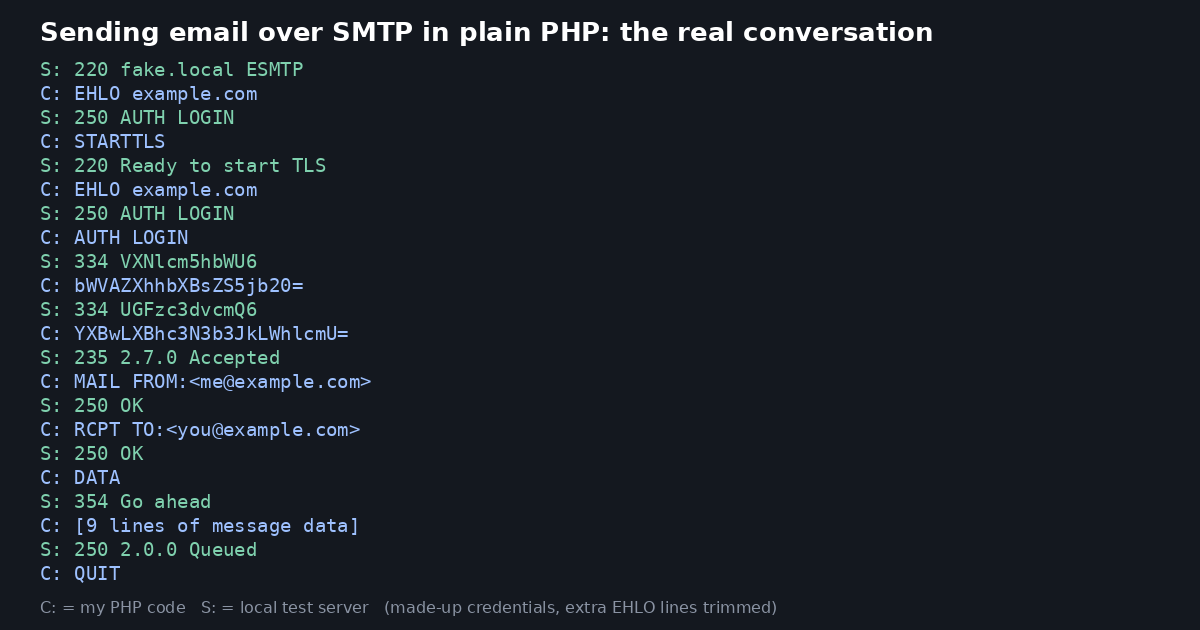
The code
Each command goes through one small function that checks the reply code and throws an exception if it isn’t one of the codes you expect. That way a failure tells you what the server said, instead of silently carrying on.
<?php
function smtp_read($smtp)
{
    $reply = '';
    while (($line = fgets($smtp, 515)) !== false) {
        $reply .= $line;
        if (substr($line, 3, 1) === ' ') break;
    }
    return $reply;
}

function smtp_cmd($smtp, $command, array $okCodes)
{
    if ($command !== null) fwrite($smtp, $command . "\r\n");
    $reply = smtp_read($smtp);
    if (!in_array(substr($reply, 0, 3), $okCodes, true)) {
        throw new Exception('SMTP said: ' . trim($reply));
    }
    return $reply;
}

function smtp_send($host, $port, $user, $pass, $to, $subject, $text, array $ssl = [])
{
    $smtp = @fsockopen('tcp://' . $host, $port, $errno, $errstr, 15);
    if (!$smtp) throw new Exception("Could not connect: $errstr ($errno)");
    stream_set_timeout($smtp, 15);
    foreach ($ssl as $key => $value) stream_context_set_option($smtp, 'ssl', $key, $value);
    try {
        smtp_cmd($smtp, null, ['220']);
        smtp_cmd($smtp, 'EHLO example.com', ['250']);
        smtp_cmd($smtp, 'STARTTLS', ['220']);
        if (!stream_socket_enable_crypto($smtp, true, STREAM_CRYPTO_METHOD_TLS_CLIENT)) {
            throw new Exception('TLS negotiation failed');
        }
        smtp_cmd($smtp, 'EHLO example.com', ['250']);
        smtp_cmd($smtp, 'AUTH LOGIN', ['334']);
        smtp_cmd($smtp, base64_encode($user), ['334']);
        smtp_cmd($smtp, base64_encode($pass), ['235']);
        smtp_cmd($smtp, "MAIL FROM:<$user>", ['250']);
        smtp_cmd($smtp, "RCPT TO:<$to>", ['250', '251']);
        smtp_cmd($smtp, 'DATA', ['354']);

        $headers  = "From: <$user>\r\n";
        $headers .= "To: <$to>\r\n";
        $headers .= 'Subject: =?UTF-8?B?' . base64_encode($subject) . "?=\r\n";
        $headers .= "MIME-Version: 1.0\r\n";
        $headers .= "Content-Type: text/plain; charset=UTF-8\r\n";
        $headers .= "Content-Transfer-Encoding: base64\r\n\r\n";
        $message = $headers . chunk_split(base64_encode($text));

        $message = preg_replace('/^\./m', '..', $message);
        fwrite($smtp, $message . "\r\n.\r\n");
        $reply = smtp_read($smtp);
        if (substr($reply, 0, 3) !== '250') throw new Exception('Message rejected: ' . trim($reply));
        fwrite($smtp, "QUIT\r\n");
        fclose($smtp);
        return true;
    } catch (Exception $e) {
        fclose($smtp);
        throw $e;
    }
}
Calling it from a cron script looks like this:
<?php
require __DIR__ . '/smtp_send.php';

try {
    smtp_send('smtp.gmail.com', 587, '[email protected]', 'your-16-character-app-password',
              '[email protected]', 'Cron says hello', "The job finished at " . date('H:i'));
    echo "Sent\n";
} catch (Exception $e) {
    error_log($e->getMessage());
}
Gmail won’t accept your normal password here. You need 2-step verification switched on, then a 16 character app password from your Google account, and that goes in the password slot. Keep it in a config file outside your web root, never in the script itself.
What I tested
My test server was a 35 line Python script with STARTTLS, so the PHP went through the same steps it would with Gmail. Here is what I found:
- The good run: the function returned
trueand the server received the message. I decoded the body afterwards and it matched what I sent, including a line containing just a full stop. - A wrong password: the server answered
535 5.7.8 Bad credentialsand the function threw an exception with exactly that text, which is what you want in a cron log. - The certificate check: my first run failed with “certificate verify failed”, because PHP checks the server’s certificate and my test one was self-signed. I did NOT turn the check off. The optional
$sslargument lets me point it at my own test certificate, and with that it worked. Leave it empty for Gmail.
One thing I haven’t done is send a message through the real Gmail from this exact code. The steps are the same as the ones above (smtp.gmail.com, port 587, STARTTLS, AUTH LOGIN), but if your account has an odd setting then the server’s reply will tell you, and the exception will pass it on.
The subject line is base64 encoded, so a pound sign or an accent such as é arrives intact. I tried Café test - £5 and the encoded subject decoded back to exactly that.